

Description
Accurate Screen Ruler for Quick Measurements
Overview
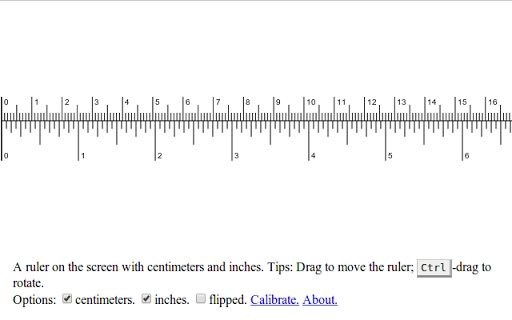
The software is designed as a digital ruler tool to help users measure distances and dimensions directly on their computer screens. It serves as a practical utility for professionals and casual users who need precise measurements without physical tools. Common use cases include graphic design, web development, document layout, and content creation, where accurate alignment and spacing are essential. The tool allows users to calibrate the ruler to match real-world measurements, ensuring reliability across different display resolutions. While the developer’s background is not publicly available, the application appears focused on simplicity and functionality. It operates as a lightweight desktop utility, ideal for quick, on-the-fly measurements during creative or technical workflows. Its core purpose is to bridge the gap between digital design and physical reference points, offering a straightforward solution for screen-based measurement tasks.
Key Features & Capabilities
- On-Screen Ruler – Displays a virtual ruler directly on the screen for visual measurement of objects, spacing, and alignment.
- Calibration Function – Allows users to adjust the ruler’s scale to match real-world units, improving accuracy across various screen types and resolutions.
- Lightweight Design – With a file size of 5.2 MB, the application consumes minimal system resources, making it suitable for older or low-spec machines.
- Multi-Platform Support – Compatible with both Windows and Mac operating systems, ensuring broad accessibility for users across different environments.
- Non-Intrusive Operation – Runs in the background without disrupting active workflows, ideal for multitasking during design or development tasks.
Users can apply the ruler to measure margins in a document, verify spacing between UI elements, or check the dimensions of an image on screen. The calibration feature is especially useful when working with high-DPI displays or when comparing digital layouts to physical printouts. This functionality supports a wide range of professional and personal use cases, from academic projects to digital art and web layout verification.
User Interface, Workflow & Performance
The user interface is minimal and focused on utility, featuring a clean, uncluttered layout that prioritizes visibility and ease of use. The ruler appears as a transparent overlay that can be positioned anywhere on the screen, with intuitive drag-and-drop controls for placement and alignment. Navigation is straightforward, requiring no learning curve for basic operation. The workflow is designed for speed: launch the tool, position the ruler, and read measurements instantly. Performance is consistent with lightweight desktop applications, though specific CPU or RAM usage details were not provided. The developer did not specify resource usage details, but the small file size suggests efficient operation. Stability appears to be maintained through a simple codebase, with no reported issues related to crashes or freezes. Overall, the tool functions reliably within standard desktop environments.
Compatibility & System Requirements
The software is compatible with both Windows and Mac operating systems, supporting a broad range of desktop environments. It is available in version 1.0, with a total installation size of 5.2 MB. The developer did not specify exact system requirements, so users should ensure their system meets the basic demands of running a desktop application. Compatibility information was partially provided, and no additional hardware specifications were listed. Users are advised to check their system’s ability to run lightweight utilities, particularly on older or less powerful machines. The application does not require a specific processor, graphics card, or memory configuration, but general desktop compatibility is expected based on the platform support.
Pros and Cons
Pros
- Simple, intuitive interface for quick measurements
- Accurate results through built-in calibration
- Small file size and low resource consumption
- Available for both Windows and Mac users
- Free to use with no licensing restrictions
Cons
- No detailed system requirements provided
- Calibration process may require external reference for full accuracy
- Limited to screen-based measurements, no export or recording features
- Interface lacks customization options for advanced users
- No built-in support for multiple units beyond standard calibration
FAQ Section
Is this software free to download?
Yes, the software is available at no cost. There are no hidden fees or subscription models.
Can I use this tool on both Windows and Mac?
Yes, the application supports both Windows and Mac operating systems.
Does the software require an internet connection?
No, the tool operates entirely offline. No internet access is needed for core functionality.
How do I calibrate the ruler for accurate measurements?
The software includes a calibration feature that allows users to set real-world dimensions to match screen pixels.
Are updates available for this tool?
Updates may be released to improve stability and compatibility. Check the official source for the latest version.
Final Thoughts
For users who need a fast, reliable way to measure elements on their screen, this digital ruler delivers a focused and effective solution. Its ability to calibrate ensures accuracy across different displays, making it a valuable asset for designers, developers, and content creators. The lightweight nature and cross-platform availability enhance its accessibility. While it lacks advanced features like measurement export or unit switching, its core purpose is fulfilled with precision and simplicity. The free pricing model removes barriers to entry, making it ideal for both professionals and students. Overall, it stands out as a dependable utility in the productivity space. Download the latest version today.
Guides & Tutorials for Accurate Ruler App for Chrome
How to install Accurate Ruler App for Chrome
- Click the Preview / Download button above.
- Once redirected, accept the terms and click Install.
- Wait for the Accurate Ruler App for Chrome download to finish on your device.
How to use Accurate Ruler App for Chrome
This software is primarily used for its core features described above. Open the app after installation to explore its capabilities.
User Reviews for Accurate Ruler App for Chrome 0
No reviews found





